Minecraft hosting that keeps up with your friends
Ryzen 7 5800X cores, NVMe storage and one-click modpack installs, ready in minutes.
Monthly price. No setup fee.
Play the most popular modpacks
Some of the most popular CurseForge modpacks, ready for your own server. Pick one to see how to host it.
 All the Mods 10Kitchen-sink tech/magic, quest-driven | 1.21.1
 RLCraftHardcore survival / RPG | 1.12.2
 The Pixelmon ModpackPokemon / monster collecting | 1.20.1
 Better MC (Forge) BMC4Vanilla-plus / adventure | 1.20.1
 All the Mods 9Kitchen-sink tech/magic, quest-driven | 1.20.1
 Prominence IILore-rich RPG | 1.20.1
 DawnCraftSouls-like action RPG | 1.18.2
 DeceasedCraftZombie survival / tech | 1.20.1
 Roguelike Adventures and DungeonsRoguelike / exploration adventure | 1.12.2
 CobbleversePokemon adventure | 1.21.1
Made for people who play Minecraft
Just you and your friends
Start a survival world in minutes. Add friends as admins so nobody has to ask you to restart it.
Modpack players
Pick a pack from the panel and play. The bigger tiers have the memory heavy packs want.
Growing communities
Plugins, whitelists and backups are all in the panel, so running a community stays manageable.
What every Minecraft server includes
One-click modpacks and plugins
Install popular packs from the panel instead of uploading files by hand.
Fast single-core speed
Tick rate follows single-core performance, so we run Ryzen 7 5800X at up to 4.7 GHz.
Automatic backups
Scheduled backups with one-click restore.
Add friends as admins
Sub-users with custom permission levels, built on Pterodactyl.
Omne-Shield protection
Automated DDoS protection on every server.
Free subdomain
Give friends a name to join instead of an IP address.
Fast where it counts
Game servers live and die by single-core speed. Here is what yours runs on.
- Game servers care about single-core speed, and that is what the Ryzen 7 5800X is good at.
- Cores are not oversold, which helps keep your tick rate steady.
- NVMe storage keeps world loads, saves and updates quick.
Every tier, every term
What each size includes, and who it suits. Longer terms save 10, 20 or 25 percent.
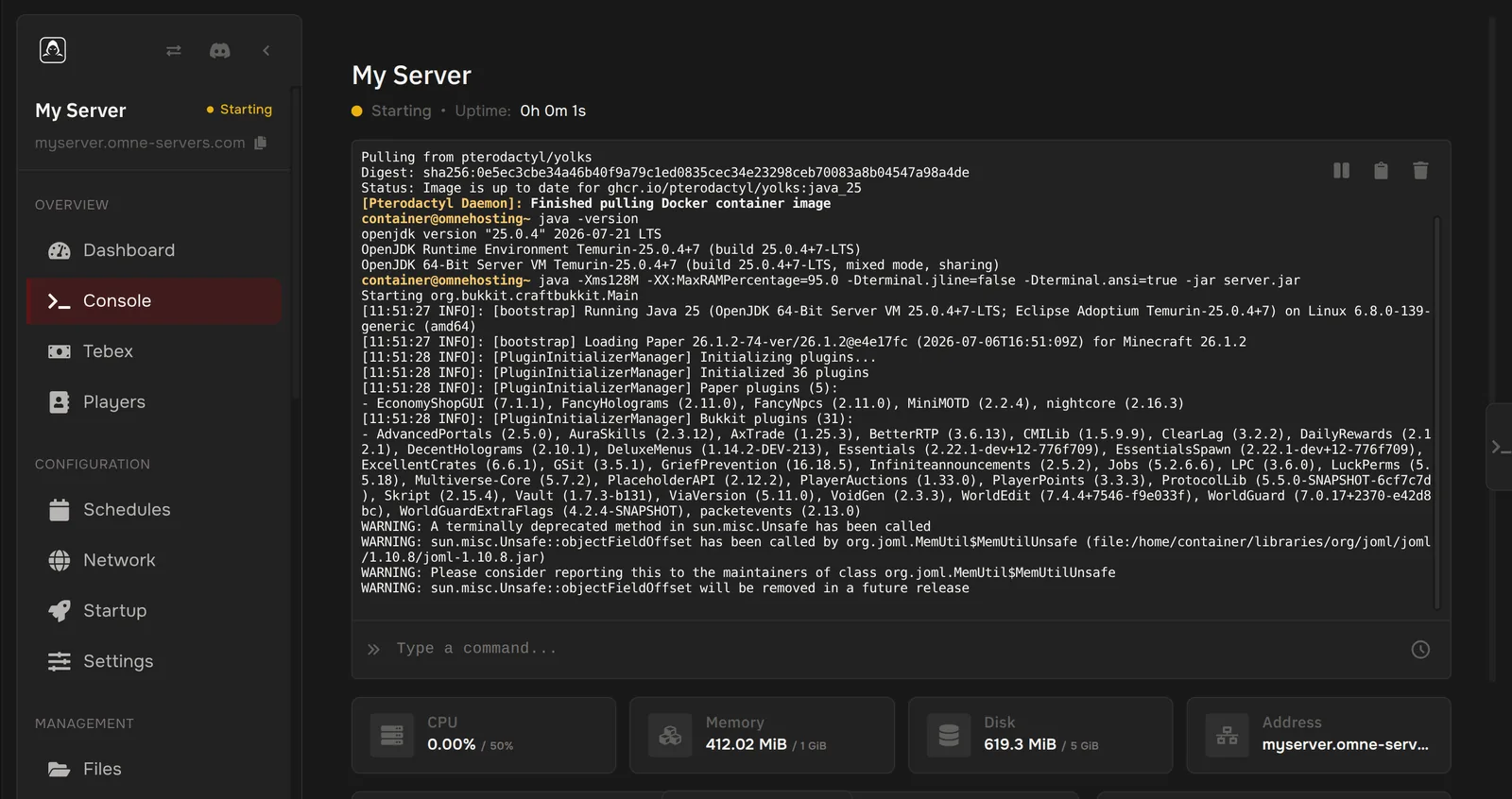
A real control panel
Everything you need to run the server, in your browser.
- Switch between Vanilla, Paper, Purpur, Spigot, Folia, Forge, NeoForge, Fabric, Quilt, Velocity, Waterfall and BungeeCord
- Search Modrinth and CurseForge to install mods, plugins and modpacks
- Manage players: whitelist, op, ban and kick without typing commands
- Live console, file manager, SFTP and scheduled tasks
- Backups with one-click restore, and a free subdomain
Bring your world with you
Already have a world or a modded setup? Moving it over is easy.
Import from your old host
Connect your existing host over SFTP and the importer brings your files across for you.
File manager or SFTP
Prefer to do it by hand? Drag files into the panel or copy them with any SFTP client.
We can help
Stuck? Open a ticket or ask on Discord and we will help you move it.
From checkout to playing
Nothing to install and nothing to forward. Here is how it goes.
- 1
Pick a plan and your options
Choose a size and any options for your game, like the framework or edition.
- 2
Check out
Pay with the method you prefer. Your 3-day money-back guarantee starts here.
- 3
We create your server
It is created after payment clears and is usually running within minutes.
- 4
Start playing
Open the panel, press start, and share the address with your friends.
Someone has your back
Help when you need it
You do not need to be a server admin to run one.
- Tickets open 24/7, with a target reply within 1 day
- Ask in our Discord community
- Step-by-step guides in our docs
3-day money-back guarantee
Not what you expected? Ask for your money back within 3 days, no questions asked.
- On new game server orders
- Days 4 to 7: by support ticket, at our discretion
- VPS is not refundable, see the refund policy
Need help getting started?
Step-by-step guides for the panel and common setups are in our docs.
Free Minecraft tools
Handy generators and calculators for server owners and players, free to use even if you are not a customer.
What customers say
Everything was easy to setup, the modpack installer is nice.
Servers run suupppeerr well. Great experience overall.
Found the tools very helpful for setting up a server as a first-timer.
Not sure yet? Try Minecraft free for 48 hours
Free trials are limited, so they may not always be available.
Running a tournament or LAN party?
1, 3, or 7-day event passes, sized from 6 to 12 GB, with no subscription to cancel afterward.
How do we compare?
Side-by-side with hosting at home and other Minecraft hosts, using their public pricing.
Minecraft questions
The things people ask before ordering.
How much RAM do I need?
Small vanilla worlds with a few friends fit the lower tiers. Modpacks need more memory, so start at 6 GB or more for a big pack.
Can I install my own modpack?
Yes. Install a popular pack from the panel, or upload your own files.
Do you support Bedrock?
Bedrock is a separate product with its own plans on the Bedrock page.
Which size should I pick?
Small vanilla worlds with a few friends fit the lower tiers. Modpacks need more memory, and the largest tier is sized for heavy packs like Allthemodium.
Can I run mods and plugins?
Yes. Choose your server software at checkout, then add mods or plugins from the panel.
How fast is my server ready?
Your server is created after payment clears and is usually running within minutes. You manage it from the panel.
Can I invite friends to help run it?
Yes. The panel has sub-users, so you can give friends access with their own permission levels.
Can I get a refund?
Yes. New game server orders have a 3-day money-back guarantee, no questions asked. Between days 4 and 7 you can ask by support ticket and we decide case by case. VPS services are not refundable. The refund policy has the full terms.
Do I get a subdomain?
Yes. You can create a free subdomain for your server from the panel, so friends join with a name instead of an IP address.
Ready for your Minecraft server?
Pick a size and you are minutes away.